> ## Documentation Index
> Fetch the complete documentation index at: https://docs-dev-feat-3pa-xaa-myorgs.mintlify.site/llms.txt
> Use this file to discover all available pages before exploring further.

> Learn how to configure an update policy form using Forms for Actions for users to review and accept new terms of service or consent updates.

# Use Cases: Configure an update policy form using Forms

<Card title="Before you start">
  1. Create a [Machine-to-Machine Application](/docs/get-started/auth0-overview/create-applications/machine-to-machine-apps) with the following scopes enabled:

  * `read:users`
  * `update:users`
  * `create:users`
  * `read:users_app_metadata`
  * `update:users_app_metadata`
  * `create:users_app_metadata`

  2. Add a [Vault connection](/docs/customize/forms/vault) using the M2M application credentials.
</Card>

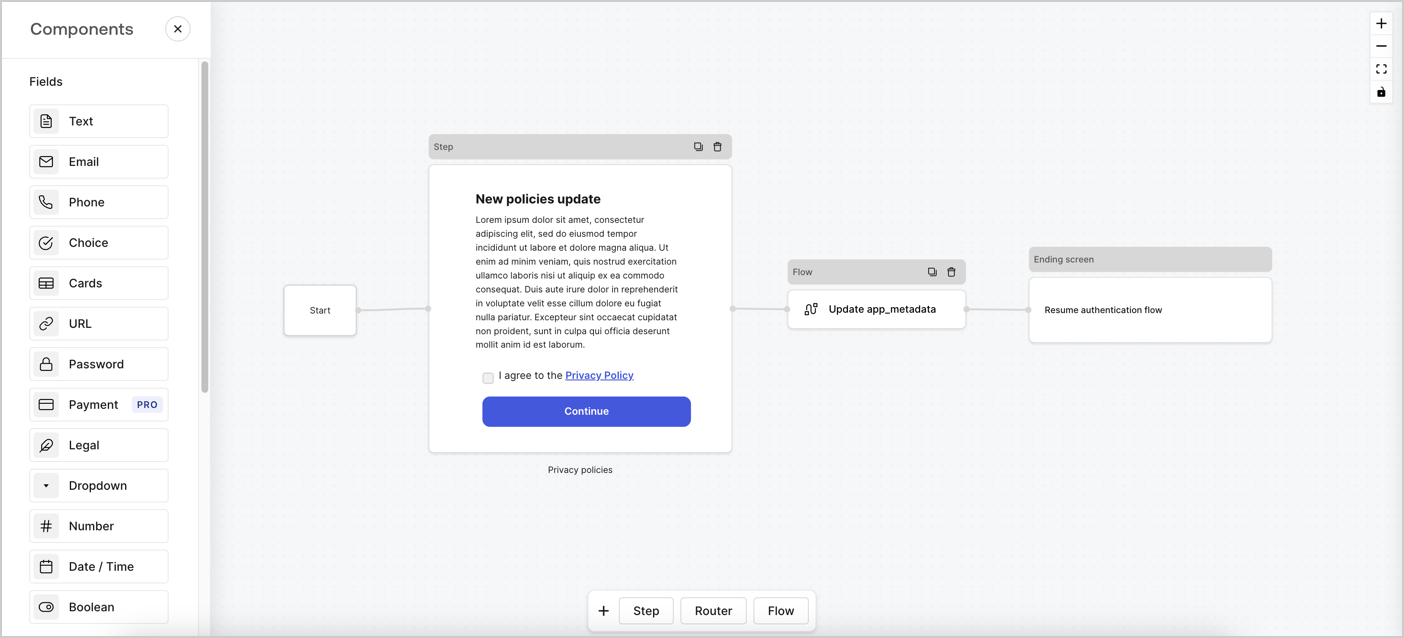
Forms for Actions allows you to create custom privacy policies flows and store the consent under the `app_metadata` object.
<Frame>
  <img src="https://mintcdn.com/docs-dev-feat-3pa-xaa-myorgs/ZEglxUZ53FEl72Rc/docs/images/cdy7uua7fh8z/6i68dMvHDTijfRmSgN1x8Q/ad900e7d4c0fb34645921435472b8684/privavy-policy-form.png?fit=max&auto=format&n=ZEglxUZ53FEl72Rc&q=85&s=0cf052ffe57d42295ba96b6987d9c4c3" alt="Dashboard > Actions > Forms > Privacy policy use case" data-og-width="1404" width="1404" data-og-height="638" height="638" data-path="docs/images/cdy7uua7fh8z/6i68dMvHDTijfRmSgN1x8Q/ad900e7d4c0fb34645921435472b8684/privavy-policy-form.png" data-optimize="true" data-opv="3" srcset="https://mintcdn.com/docs-dev-feat-3pa-xaa-myorgs/ZEglxUZ53FEl72Rc/docs/images/cdy7uua7fh8z/6i68dMvHDTijfRmSgN1x8Q/ad900e7d4c0fb34645921435472b8684/privavy-policy-form.png?w=280&fit=max&auto=format&n=ZEglxUZ53FEl72Rc&q=85&s=5a6b590edab46435888cabb5fd9713e1 280w, https://mintcdn.com/docs-dev-feat-3pa-xaa-myorgs/ZEglxUZ53FEl72Rc/docs/images/cdy7uua7fh8z/6i68dMvHDTijfRmSgN1x8Q/ad900e7d4c0fb34645921435472b8684/privavy-policy-form.png?w=560&fit=max&auto=format&n=ZEglxUZ53FEl72Rc&q=85&s=e87c63274bfd62a1768cda7ea975914e 560w, https://mintcdn.com/docs-dev-feat-3pa-xaa-myorgs/ZEglxUZ53FEl72Rc/docs/images/cdy7uua7fh8z/6i68dMvHDTijfRmSgN1x8Q/ad900e7d4c0fb34645921435472b8684/privavy-policy-form.png?w=840&fit=max&auto=format&n=ZEglxUZ53FEl72Rc&q=85&s=b7db1f5d1e9940ea496b71c7feb5b7c1 840w, https://mintcdn.com/docs-dev-feat-3pa-xaa-myorgs/ZEglxUZ53FEl72Rc/docs/images/cdy7uua7fh8z/6i68dMvHDTijfRmSgN1x8Q/ad900e7d4c0fb34645921435472b8684/privavy-policy-form.png?w=1100&fit=max&auto=format&n=ZEglxUZ53FEl72Rc&q=85&s=423d7f421bce383e66599915d256fdf9 1100w, https://mintcdn.com/docs-dev-feat-3pa-xaa-myorgs/ZEglxUZ53FEl72Rc/docs/images/cdy7uua7fh8z/6i68dMvHDTijfRmSgN1x8Q/ad900e7d4c0fb34645921435472b8684/privavy-policy-form.png?w=1650&fit=max&auto=format&n=ZEglxUZ53FEl72Rc&q=85&s=37d6d4e6ef14d7f1a2dfb1c2278b0d8c 1650w, https://mintcdn.com/docs-dev-feat-3pa-xaa-myorgs/ZEglxUZ53FEl72Rc/docs/images/cdy7uua7fh8z/6i68dMvHDTijfRmSgN1x8Q/ad900e7d4c0fb34645921435472b8684/privavy-policy-form.png?w=2500&fit=max&auto=format&n=ZEglxUZ53FEl72Rc&q=85&s=183a583c8d98eb5561a0d8f86a29a7ab 2500w" />
</Frame>

The sections below outline how you can create an Update Policy form using nodes and flows, along with steps for adding your form to a [Post Login](/docs/customize/actions/explore-triggers/signup-and-login-triggers/login-trigger) Action.

## Create a form from scratch

Follow these steps to create a form to gather information:

1. Open the Form editor by selecting **Auth0 Dashboard > Actions > Forms.**
2. Select **Create Form** > **Start from scratch**.

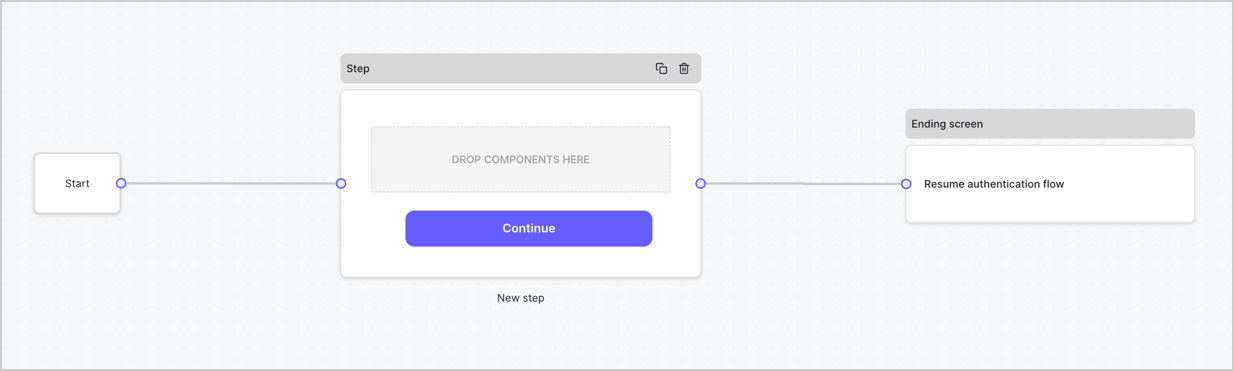
By default, a new form contains a Start node, a Step node, and an Ending screen node.
<Frame>
  <img src="https://mintcdn.com/docs-dev-feat-3pa-xaa-myorgs/709CbLSEMHICyZKg/docs/images/cdy7uua7fh8z/2TZ9jSjgEcARFpULI6hz4R/a4319a1bd482f2ee5cc23100fdb2f42c/New-form-Forms-for-action-use-case.png?fit=max&auto=format&n=709CbLSEMHICyZKg&q=85&s=7b5df567b4799ee8975bd87c449e1205" alt="Dashboard > Forms > Use Cases > Form" data-og-width="1234" width="1234" data-og-height="371" height="371" data-path="docs/images/cdy7uua7fh8z/2TZ9jSjgEcARFpULI6hz4R/a4319a1bd482f2ee5cc23100fdb2f42c/New-form-Forms-for-action-use-case.png" data-optimize="true" data-opv="3" srcset="https://mintcdn.com/docs-dev-feat-3pa-xaa-myorgs/709CbLSEMHICyZKg/docs/images/cdy7uua7fh8z/2TZ9jSjgEcARFpULI6hz4R/a4319a1bd482f2ee5cc23100fdb2f42c/New-form-Forms-for-action-use-case.png?w=280&fit=max&auto=format&n=709CbLSEMHICyZKg&q=85&s=9808cdb09e9d421e1dd292af22be4a2d 280w, https://mintcdn.com/docs-dev-feat-3pa-xaa-myorgs/709CbLSEMHICyZKg/docs/images/cdy7uua7fh8z/2TZ9jSjgEcARFpULI6hz4R/a4319a1bd482f2ee5cc23100fdb2f42c/New-form-Forms-for-action-use-case.png?w=560&fit=max&auto=format&n=709CbLSEMHICyZKg&q=85&s=1fc4c355d3c44769e88b2ecfb480388f 560w, https://mintcdn.com/docs-dev-feat-3pa-xaa-myorgs/709CbLSEMHICyZKg/docs/images/cdy7uua7fh8z/2TZ9jSjgEcARFpULI6hz4R/a4319a1bd482f2ee5cc23100fdb2f42c/New-form-Forms-for-action-use-case.png?w=840&fit=max&auto=format&n=709CbLSEMHICyZKg&q=85&s=43abdd3a9072c254f2611cca0c19f5d4 840w, https://mintcdn.com/docs-dev-feat-3pa-xaa-myorgs/709CbLSEMHICyZKg/docs/images/cdy7uua7fh8z/2TZ9jSjgEcARFpULI6hz4R/a4319a1bd482f2ee5cc23100fdb2f42c/New-form-Forms-for-action-use-case.png?w=1100&fit=max&auto=format&n=709CbLSEMHICyZKg&q=85&s=8cadddd8328a2e558a840d52b50e4ad9 1100w, https://mintcdn.com/docs-dev-feat-3pa-xaa-myorgs/709CbLSEMHICyZKg/docs/images/cdy7uua7fh8z/2TZ9jSjgEcARFpULI6hz4R/a4319a1bd482f2ee5cc23100fdb2f42c/New-form-Forms-for-action-use-case.png?w=1650&fit=max&auto=format&n=709CbLSEMHICyZKg&q=85&s=0850f4ee82f51f7230a120bd5f918238 1650w, https://mintcdn.com/docs-dev-feat-3pa-xaa-myorgs/709CbLSEMHICyZKg/docs/images/cdy7uua7fh8z/2TZ9jSjgEcARFpULI6hz4R/a4319a1bd482f2ee5cc23100fdb2f42c/New-form-Forms-for-action-use-case.png?w=2500&fit=max&auto=format&n=709CbLSEMHICyZKg&q=85&s=4299e3db9d3f295f9fe517d0b3119260 2500w" />
</Frame>

### Configure the Step node

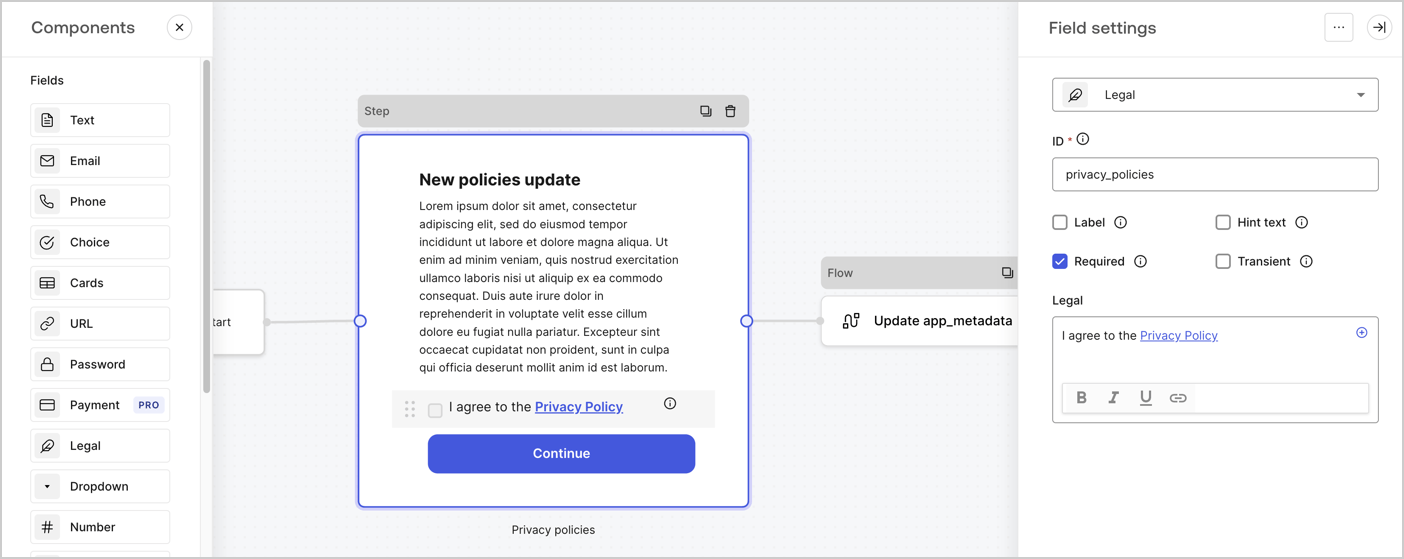
The Step node is the graphical interface visible to users. Add [Fields](/docs/customize/forms/nodes-and-components) to the Step node to collect the new agreement acceptance value by following these steps:

1. Drag a **Rich text** field from the **Components menu** into the **Step** node.

   * **Rich text**: Enter a description of your privacy policies updates.
   * Select **Save**.
2. Drag a **Legal** field into the **Step** node.

   * **ID**: Enter `privacy_policies`.
   * **Required**: Enable the checkbox.
   * **Legal**: Enter `I agree to the Privacy Policy`.
   * Select **Save**.
3. Select **Publish** to save.
<Frame>
  <img src="https://mintcdn.com/docs-dev-feat-3pa-xaa-myorgs/xgq5JB8oIpR_kP0B/docs/images/cdy7uua7fh8z/59zFFjQjAnjogkc2QGIqqJ/0ad66b1b636544122aa4e65968b76c2c/privacy-policy-step-node.png?fit=max&auto=format&n=xgq5JB8oIpR_kP0B&q=85&s=fb0c764dfc01df8e78a9be555aca9e39" alt="Dashboard > Actions > Forms > Use case privacy policy step node" data-og-width="1404" width="1404" data-og-height="559" height="559" data-path="docs/images/cdy7uua7fh8z/59zFFjQjAnjogkc2QGIqqJ/0ad66b1b636544122aa4e65968b76c2c/privacy-policy-step-node.png" data-optimize="true" data-opv="3" srcset="https://mintcdn.com/docs-dev-feat-3pa-xaa-myorgs/xgq5JB8oIpR_kP0B/docs/images/cdy7uua7fh8z/59zFFjQjAnjogkc2QGIqqJ/0ad66b1b636544122aa4e65968b76c2c/privacy-policy-step-node.png?w=280&fit=max&auto=format&n=xgq5JB8oIpR_kP0B&q=85&s=87441a20c8709a2d59e8a8c8f33262e3 280w, https://mintcdn.com/docs-dev-feat-3pa-xaa-myorgs/xgq5JB8oIpR_kP0B/docs/images/cdy7uua7fh8z/59zFFjQjAnjogkc2QGIqqJ/0ad66b1b636544122aa4e65968b76c2c/privacy-policy-step-node.png?w=560&fit=max&auto=format&n=xgq5JB8oIpR_kP0B&q=85&s=0dab34efc1daa39557220f3d73123b6f 560w, https://mintcdn.com/docs-dev-feat-3pa-xaa-myorgs/xgq5JB8oIpR_kP0B/docs/images/cdy7uua7fh8z/59zFFjQjAnjogkc2QGIqqJ/0ad66b1b636544122aa4e65968b76c2c/privacy-policy-step-node.png?w=840&fit=max&auto=format&n=xgq5JB8oIpR_kP0B&q=85&s=fa6713bc959ebdf655cd84293ecc1377 840w, https://mintcdn.com/docs-dev-feat-3pa-xaa-myorgs/xgq5JB8oIpR_kP0B/docs/images/cdy7uua7fh8z/59zFFjQjAnjogkc2QGIqqJ/0ad66b1b636544122aa4e65968b76c2c/privacy-policy-step-node.png?w=1100&fit=max&auto=format&n=xgq5JB8oIpR_kP0B&q=85&s=7d48b654be18c4eb27e2c03e35243808 1100w, https://mintcdn.com/docs-dev-feat-3pa-xaa-myorgs/xgq5JB8oIpR_kP0B/docs/images/cdy7uua7fh8z/59zFFjQjAnjogkc2QGIqqJ/0ad66b1b636544122aa4e65968b76c2c/privacy-policy-step-node.png?w=1650&fit=max&auto=format&n=xgq5JB8oIpR_kP0B&q=85&s=40199baef525eda9e34039015e68695e 1650w, https://mintcdn.com/docs-dev-feat-3pa-xaa-myorgs/xgq5JB8oIpR_kP0B/docs/images/cdy7uua7fh8z/59zFFjQjAnjogkc2QGIqqJ/0ad66b1b636544122aa4e65968b76c2c/privacy-policy-step-node.png?w=2500&fit=max&auto=format&n=xgq5JB8oIpR_kP0B&q=85&s=1d731caf3422b1e09fdd419111993312 2500w" />
</Frame>

### Configure the Flow node

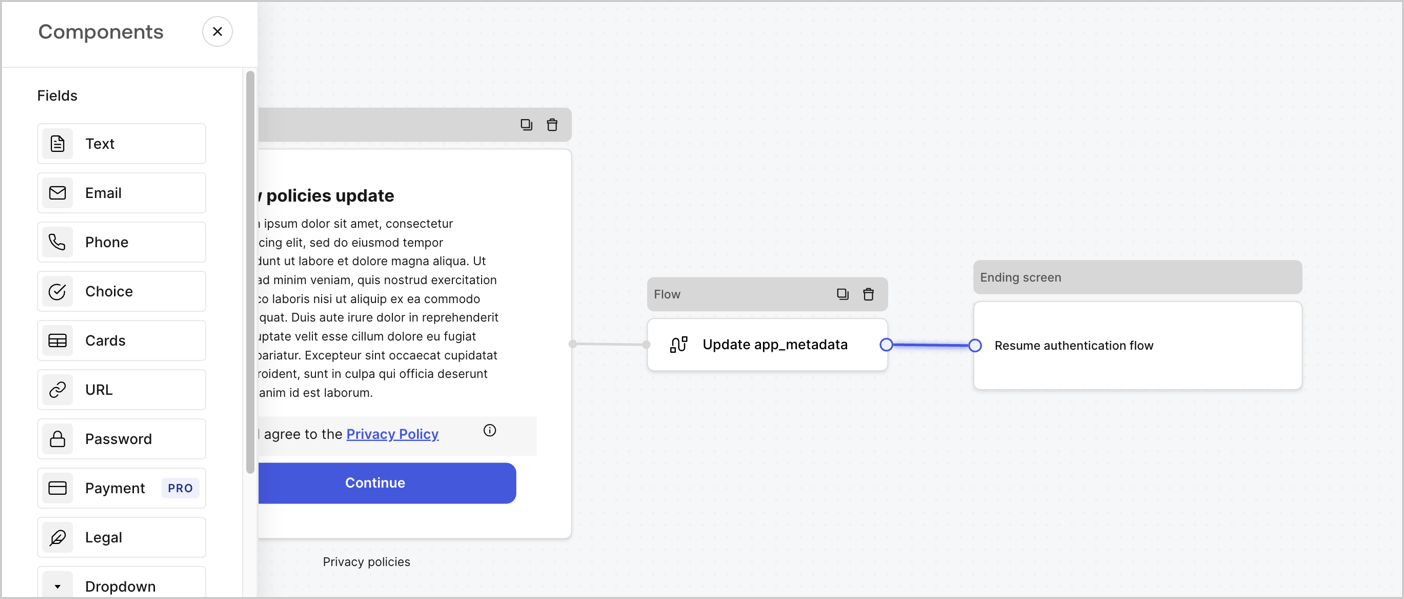
Add a **Flow** node after the **Step** node to update the `app_metadata` and resume the authentication flow by following these steps:

1. Select **Flow** from the bottom of the Form editor.
2. Remove the existing link between the **Step** and **Ending Screen** nodes.
3. Select the new **Flow** > **Click to add a flow** > **Create a new flow.**

   * Enter `Update app_metadata` in the **Name** field.
   * Select **Create**.
   * Select **Save**.
4. Link the **Flow** node to the **Step** and **Ending Screen** nodes as pictured below.
5. Select **Publish** to save.
<Frame>
  <img src="https://mintcdn.com/docs-dev-feat-3pa-xaa-myorgs/ZEglxUZ53FEl72Rc/docs/images/cdy7uua7fh8z/6YIkzm7SrpM9LW76AXuRzh/353c518fe82bbaa440836da1d83596d6/link-policies.png?fit=max&auto=format&n=ZEglxUZ53FEl72Rc&q=85&s=145a5014d8174c3fccc30a3e54db9386" alt="Dashboard > Actions > Forms > Form" data-og-width="1404" width="1404" data-og-height="599" height="599" data-path="docs/images/cdy7uua7fh8z/6YIkzm7SrpM9LW76AXuRzh/353c518fe82bbaa440836da1d83596d6/link-policies.png" data-optimize="true" data-opv="3" srcset="https://mintcdn.com/docs-dev-feat-3pa-xaa-myorgs/ZEglxUZ53FEl72Rc/docs/images/cdy7uua7fh8z/6YIkzm7SrpM9LW76AXuRzh/353c518fe82bbaa440836da1d83596d6/link-policies.png?w=280&fit=max&auto=format&n=ZEglxUZ53FEl72Rc&q=85&s=8cc056e9b499c14b3eafab657882887e 280w, https://mintcdn.com/docs-dev-feat-3pa-xaa-myorgs/ZEglxUZ53FEl72Rc/docs/images/cdy7uua7fh8z/6YIkzm7SrpM9LW76AXuRzh/353c518fe82bbaa440836da1d83596d6/link-policies.png?w=560&fit=max&auto=format&n=ZEglxUZ53FEl72Rc&q=85&s=79dcc049a0aa20b9fc6649382a11b555 560w, https://mintcdn.com/docs-dev-feat-3pa-xaa-myorgs/ZEglxUZ53FEl72Rc/docs/images/cdy7uua7fh8z/6YIkzm7SrpM9LW76AXuRzh/353c518fe82bbaa440836da1d83596d6/link-policies.png?w=840&fit=max&auto=format&n=ZEglxUZ53FEl72Rc&q=85&s=93a3ba38ed3f655e9db34e18fe37fc13 840w, https://mintcdn.com/docs-dev-feat-3pa-xaa-myorgs/ZEglxUZ53FEl72Rc/docs/images/cdy7uua7fh8z/6YIkzm7SrpM9LW76AXuRzh/353c518fe82bbaa440836da1d83596d6/link-policies.png?w=1100&fit=max&auto=format&n=ZEglxUZ53FEl72Rc&q=85&s=08d64b659d822ef632b87d7e546bd5f5 1100w, https://mintcdn.com/docs-dev-feat-3pa-xaa-myorgs/ZEglxUZ53FEl72Rc/docs/images/cdy7uua7fh8z/6YIkzm7SrpM9LW76AXuRzh/353c518fe82bbaa440836da1d83596d6/link-policies.png?w=1650&fit=max&auto=format&n=ZEglxUZ53FEl72Rc&q=85&s=785cb68acc60bf01bcdd98343e1bc3a6 1650w, https://mintcdn.com/docs-dev-feat-3pa-xaa-myorgs/ZEglxUZ53FEl72Rc/docs/images/cdy7uua7fh8z/6YIkzm7SrpM9LW76AXuRzh/353c518fe82bbaa440836da1d83596d6/link-policies.png?w=2500&fit=max&auto=format&n=ZEglxUZ53FEl72Rc&q=85&s=48c0a3c612cb9a5ccd789703d4ffae04 2500w" />
</Frame>

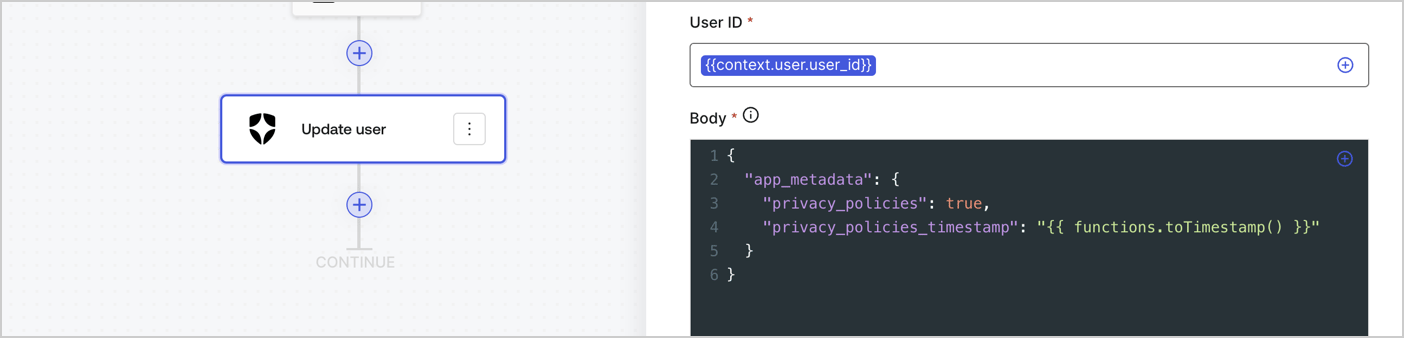
Add an Auth0 Update user action to the flow by following these steps:

1. Select the **Flow** **Update app\_metadata** > **Edit flow** to open the Flow editor in a new tab.
2. Below the StartAction, select the **+** icon to add an **Update user** action. Complete the fields below, then select **Save** to continue.

   * **Connection**: Select from the dropdown the Vault connection to your M2M application.

   * **User ID**: Enter `{{context.user.user_id}}`.

   * **Body**: Copy and paste the following code to update the app\_metadata with the privacy\_policies and privacy\_policies\_timestamp properties.

     ```text lines theme={null}
     {
       "app_metadata": {
         "privacy_policies": true,
         "privacy_policies_timestamp": "{{ functions.toTimestamp() }}"
       }
     }
     ```

   * Select **Save**.
3. Select **Publish** to save.
<Frame>
  <img src="https://mintcdn.com/docs-dev-feat-3pa-xaa-myorgs/DaWW7sVN_rUCPnGH/docs/images/cdy7uua7fh8z/CvMNIwWrOUwaFW4X3G28p/1fb70ae57a20749d9ffaaba8dc0b7e26/update-user-privacy.png?fit=max&auto=format&n=DaWW7sVN_rUCPnGH&q=85&s=83694a8dcc5091e8eddd312d91f2a20c" alt="Dashboard > Actions > Forms > User case privacy policy code" data-og-width="1404" width="1404" data-og-height="338" height="338" data-path="docs/images/cdy7uua7fh8z/CvMNIwWrOUwaFW4X3G28p/1fb70ae57a20749d9ffaaba8dc0b7e26/update-user-privacy.png" data-optimize="true" data-opv="3" srcset="https://mintcdn.com/docs-dev-feat-3pa-xaa-myorgs/DaWW7sVN_rUCPnGH/docs/images/cdy7uua7fh8z/CvMNIwWrOUwaFW4X3G28p/1fb70ae57a20749d9ffaaba8dc0b7e26/update-user-privacy.png?w=280&fit=max&auto=format&n=DaWW7sVN_rUCPnGH&q=85&s=756f1734e84cb86fe6f2253c0fd3b5ff 280w, https://mintcdn.com/docs-dev-feat-3pa-xaa-myorgs/DaWW7sVN_rUCPnGH/docs/images/cdy7uua7fh8z/CvMNIwWrOUwaFW4X3G28p/1fb70ae57a20749d9ffaaba8dc0b7e26/update-user-privacy.png?w=560&fit=max&auto=format&n=DaWW7sVN_rUCPnGH&q=85&s=a774df76453ed1a47e5a3fa436091b45 560w, https://mintcdn.com/docs-dev-feat-3pa-xaa-myorgs/DaWW7sVN_rUCPnGH/docs/images/cdy7uua7fh8z/CvMNIwWrOUwaFW4X3G28p/1fb70ae57a20749d9ffaaba8dc0b7e26/update-user-privacy.png?w=840&fit=max&auto=format&n=DaWW7sVN_rUCPnGH&q=85&s=c5222dcbf20497ab81dbf68948d7baa5 840w, https://mintcdn.com/docs-dev-feat-3pa-xaa-myorgs/DaWW7sVN_rUCPnGH/docs/images/cdy7uua7fh8z/CvMNIwWrOUwaFW4X3G28p/1fb70ae57a20749d9ffaaba8dc0b7e26/update-user-privacy.png?w=1100&fit=max&auto=format&n=DaWW7sVN_rUCPnGH&q=85&s=de0438cfee57673e86bd407eaf50b788 1100w, https://mintcdn.com/docs-dev-feat-3pa-xaa-myorgs/DaWW7sVN_rUCPnGH/docs/images/cdy7uua7fh8z/CvMNIwWrOUwaFW4X3G28p/1fb70ae57a20749d9ffaaba8dc0b7e26/update-user-privacy.png?w=1650&fit=max&auto=format&n=DaWW7sVN_rUCPnGH&q=85&s=d0243ba93f855b76762e5006708f209f 1650w, https://mintcdn.com/docs-dev-feat-3pa-xaa-myorgs/DaWW7sVN_rUCPnGH/docs/images/cdy7uua7fh8z/CvMNIwWrOUwaFW4X3G28p/1fb70ae57a20749d9ffaaba8dc0b7e26/update-user-privacy.png?w=2500&fit=max&auto=format&n=DaWW7sVN_rUCPnGH&q=85&s=8310bda065e85f4e5e971756cc66fce8 2500w" />
</Frame>

<Callout icon="file-lines" color="#0EA5E9" iconType="regular">
  The flow **Update app\_metadata** adds a `privacy_policies true` value to the app`_metadata` object and also generates a timestamp with a [helper function.](/docs/customize/forms/variables)
</Callout>

## Retrieve the form render code

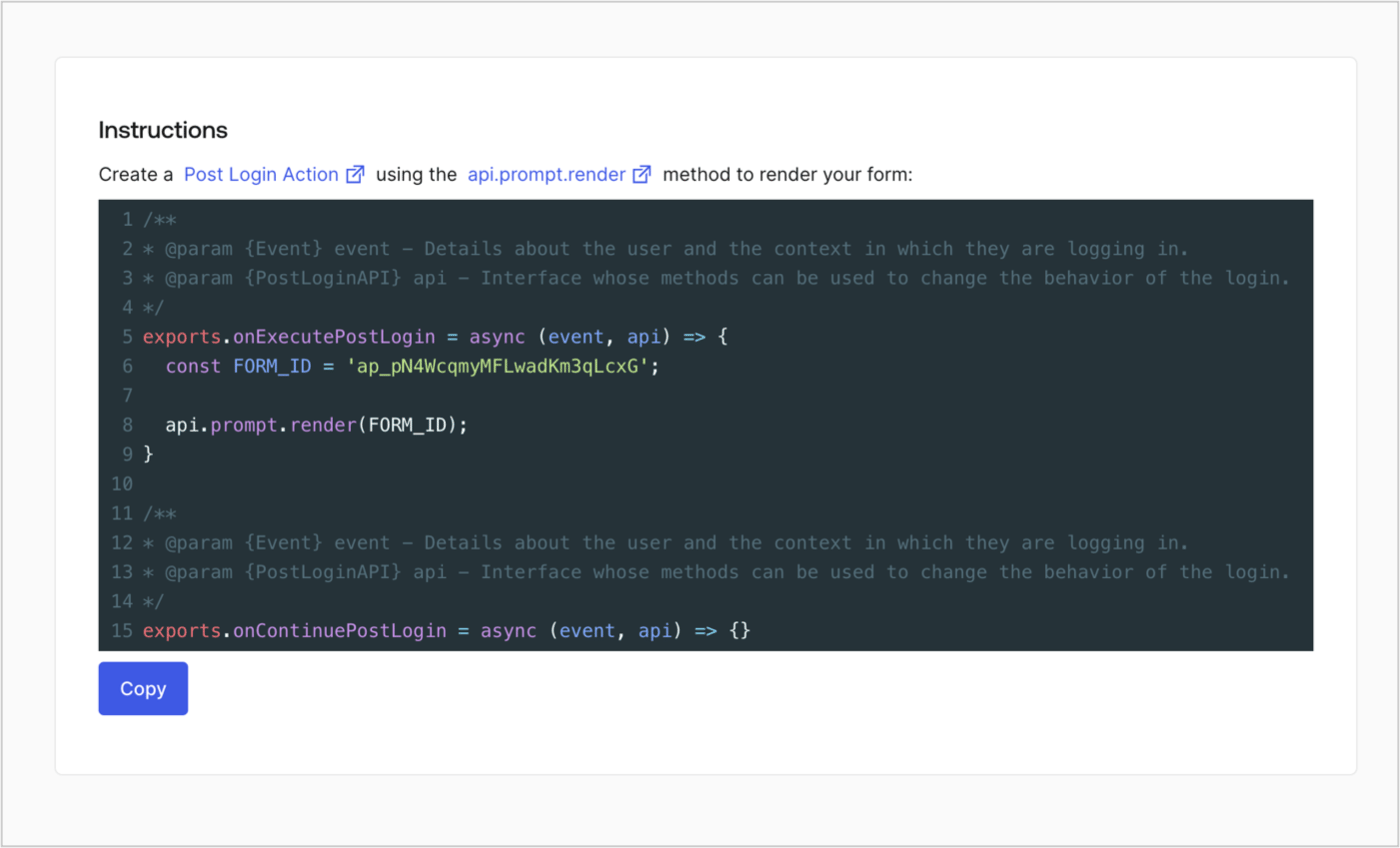
Retrieve your form render code to visually render the form with a custom Post Login Action by following these steps:

* From the Form editor, select **`<> Render`**.
* Select **Copy**.
<Frame>
  <img src="https://mintcdn.com/docs-dev-feat-3pa-xaa-myorgs/rL28KdFqnaS86Fo8/docs/images/cdy7uua7fh8z/2EIUzc539sq9lwoTKbjoJv/496a864c0fc44a782c9cadca119dbfb0/embed.png?fit=max&auto=format&n=rL28KdFqnaS86Fo8&q=85&s=1fc90f63254bb42f85016f74011eb760" alt="Dashboard > Actions > Forms > Form > Embed" data-og-width="1400" width="1400" data-og-height="848" height="848" data-path="docs/images/cdy7uua7fh8z/2EIUzc539sq9lwoTKbjoJv/496a864c0fc44a782c9cadca119dbfb0/embed.png" data-optimize="true" data-opv="3" srcset="https://mintcdn.com/docs-dev-feat-3pa-xaa-myorgs/rL28KdFqnaS86Fo8/docs/images/cdy7uua7fh8z/2EIUzc539sq9lwoTKbjoJv/496a864c0fc44a782c9cadca119dbfb0/embed.png?w=280&fit=max&auto=format&n=rL28KdFqnaS86Fo8&q=85&s=8054794b8e39e0a37bd5b911f4daf2e1 280w, https://mintcdn.com/docs-dev-feat-3pa-xaa-myorgs/rL28KdFqnaS86Fo8/docs/images/cdy7uua7fh8z/2EIUzc539sq9lwoTKbjoJv/496a864c0fc44a782c9cadca119dbfb0/embed.png?w=560&fit=max&auto=format&n=rL28KdFqnaS86Fo8&q=85&s=15280891d77e38180899152f3f2ea6fb 560w, https://mintcdn.com/docs-dev-feat-3pa-xaa-myorgs/rL28KdFqnaS86Fo8/docs/images/cdy7uua7fh8z/2EIUzc539sq9lwoTKbjoJv/496a864c0fc44a782c9cadca119dbfb0/embed.png?w=840&fit=max&auto=format&n=rL28KdFqnaS86Fo8&q=85&s=92a9c7e0ab2f7bf1220900f796718e78 840w, https://mintcdn.com/docs-dev-feat-3pa-xaa-myorgs/rL28KdFqnaS86Fo8/docs/images/cdy7uua7fh8z/2EIUzc539sq9lwoTKbjoJv/496a864c0fc44a782c9cadca119dbfb0/embed.png?w=1100&fit=max&auto=format&n=rL28KdFqnaS86Fo8&q=85&s=573a3e387eeb244d3e2d519f191ed46e 1100w, https://mintcdn.com/docs-dev-feat-3pa-xaa-myorgs/rL28KdFqnaS86Fo8/docs/images/cdy7uua7fh8z/2EIUzc539sq9lwoTKbjoJv/496a864c0fc44a782c9cadca119dbfb0/embed.png?w=1650&fit=max&auto=format&n=rL28KdFqnaS86Fo8&q=85&s=ddfe322a450287e7627bbbbd59b0c0c6 1650w, https://mintcdn.com/docs-dev-feat-3pa-xaa-myorgs/rL28KdFqnaS86Fo8/docs/images/cdy7uua7fh8z/2EIUzc539sq9lwoTKbjoJv/496a864c0fc44a782c9cadca119dbfb0/embed.png?w=2500&fit=max&auto=format&n=rL28KdFqnaS86Fo8&q=85&s=215527b2cb674707e27d9a78ad02e5df 2500w" />
</Frame>

## Create a Post Login Action

Create a post-login Action to render your form by following these steps:

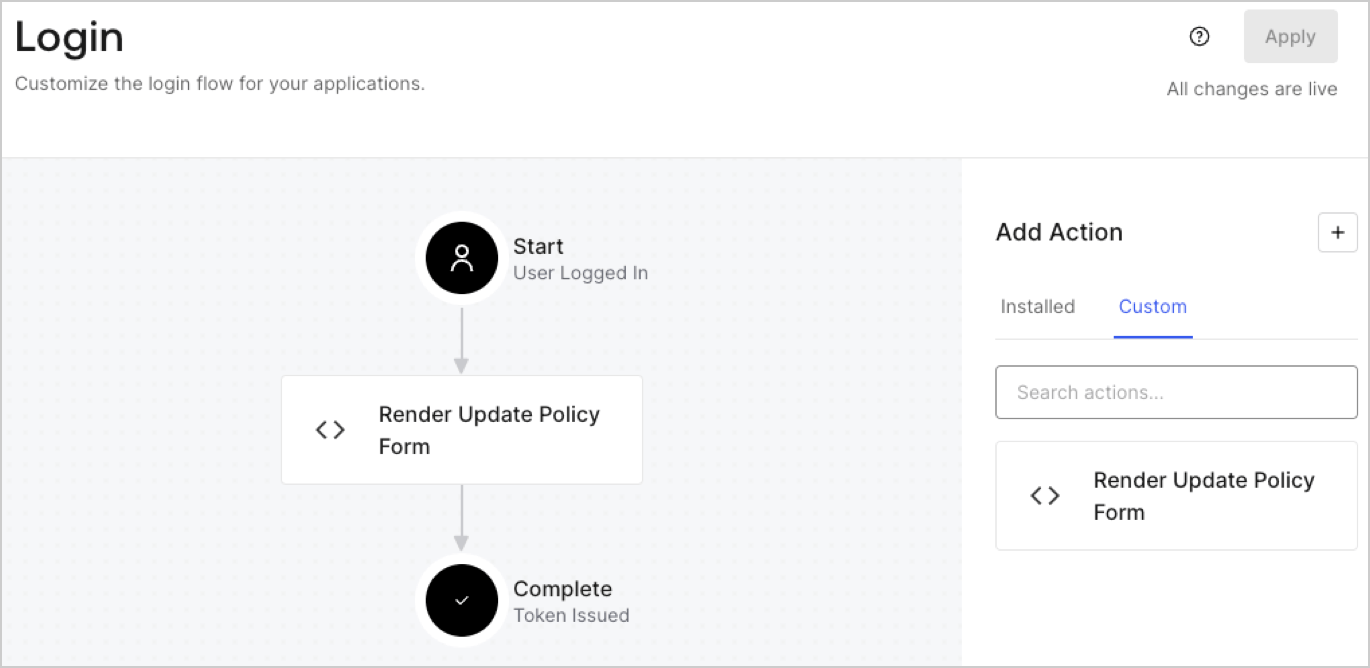
1. Navigate to **Auth0 Dashboard > Actions > Flows > Login.**
2. Select the **+** icon and Select **Build from scratch**:

   * **Name**: Enter `Render Update Policy Form`.
   * **Trigger**: Select `Login / Post Login`.
   * **Runtime**: Select the recommended version.
3. Select **Create**.

To configure the post-login Action:

1. Delete the existing code from the Code editor.
2. Paste the form render code into the Code editor.
3. Edit the code to define the conditional logic that will render the form.

   ```javascript lines theme={null}
   /**
   * @param {Event} event - Details about the user and the context in which they are logging in.
   * @param {PostLoginAPI} api - Interface whose methods can be used to change the behavior of the login.
   */
   exports.onExecutePostLogin = async (event, api) => {
     const FORM_ID = 'REPLACE_WITH_YOUR_FORM_ID';

     if (event.user.app_metadata.privacy_policies !== true) {
       api.prompt.render(FORM_ID);
     }
   }

   exports.onContinuePostLogin = async (event, api) => { }
   ```

   <Callout icon="file-lines" color="#0EA5E9" iconType="regular">
     The example code above will render the form when a user is missing the app metadata `privacy_policies` property.
   </Callout>
4. Select **Deploy.**
5. Drag and Drop the **Render Update Policy Form** Action to the **Login** flow.
   <Frame>
     <img src="https://mintcdn.com/docs-dev-feat-3pa-xaa-myorgs/fAbdTllXlSMfi8yG/docs/images/cdy7uua7fh8z/5TOwDgevZsBqd7yZynUYWU/41ca909dc3007aed4f40ff794a05efa5/postlogin.png?fit=max&auto=format&n=fAbdTllXlSMfi8yG&q=85&s=ebe644ec5b6e10876a491228821497be" alt="Dashboard > Forms > Use Case > Render update policy form login action" data-og-width="1370" width="1370" data-og-height="668" height="668" data-path="docs/images/cdy7uua7fh8z/5TOwDgevZsBqd7yZynUYWU/41ca909dc3007aed4f40ff794a05efa5/postlogin.png" data-optimize="true" data-opv="3" srcset="https://mintcdn.com/docs-dev-feat-3pa-xaa-myorgs/fAbdTllXlSMfi8yG/docs/images/cdy7uua7fh8z/5TOwDgevZsBqd7yZynUYWU/41ca909dc3007aed4f40ff794a05efa5/postlogin.png?w=280&fit=max&auto=format&n=fAbdTllXlSMfi8yG&q=85&s=83247ddd60e0664dcb0c175d723d13b6 280w, https://mintcdn.com/docs-dev-feat-3pa-xaa-myorgs/fAbdTllXlSMfi8yG/docs/images/cdy7uua7fh8z/5TOwDgevZsBqd7yZynUYWU/41ca909dc3007aed4f40ff794a05efa5/postlogin.png?w=560&fit=max&auto=format&n=fAbdTllXlSMfi8yG&q=85&s=c0607051fda395e818e9dce7b05be277 560w, https://mintcdn.com/docs-dev-feat-3pa-xaa-myorgs/fAbdTllXlSMfi8yG/docs/images/cdy7uua7fh8z/5TOwDgevZsBqd7yZynUYWU/41ca909dc3007aed4f40ff794a05efa5/postlogin.png?w=840&fit=max&auto=format&n=fAbdTllXlSMfi8yG&q=85&s=b60ab0541f57bd782179eaed8ba580f3 840w, https://mintcdn.com/docs-dev-feat-3pa-xaa-myorgs/fAbdTllXlSMfi8yG/docs/images/cdy7uua7fh8z/5TOwDgevZsBqd7yZynUYWU/41ca909dc3007aed4f40ff794a05efa5/postlogin.png?w=1100&fit=max&auto=format&n=fAbdTllXlSMfi8yG&q=85&s=7378958c689774ae4937d100b6338151 1100w, https://mintcdn.com/docs-dev-feat-3pa-xaa-myorgs/fAbdTllXlSMfi8yG/docs/images/cdy7uua7fh8z/5TOwDgevZsBqd7yZynUYWU/41ca909dc3007aed4f40ff794a05efa5/postlogin.png?w=1650&fit=max&auto=format&n=fAbdTllXlSMfi8yG&q=85&s=b73620caa7aaa67be8691426463dc431 1650w, https://mintcdn.com/docs-dev-feat-3pa-xaa-myorgs/fAbdTllXlSMfi8yG/docs/images/cdy7uua7fh8z/5TOwDgevZsBqd7yZynUYWU/41ca909dc3007aed4f40ff794a05efa5/postlogin.png?w=2500&fit=max&auto=format&n=fAbdTllXlSMfi8yG&q=85&s=9bc8a4693477ade1b502c840914fbedc 2500w" />
   </Frame>
6. Select **Apply.**

### Test implementation

Test the implementation by following these steps:

1. Log in with an existing user whose app`_metadata` attribute `privacy_policies` does not have a value.
2. The post-login Action in the Login flow will render the form and prompt for acceptance.
3. Select **Auth0 Dashboard > User Management > Users,** locate the user and verify that the `app_metadata` attribute `privacy_policies` contains a `true` value and a timestamp.
